For iPhone, iPhone Duo and iPad · Free to try
NewRead First: a few lines of your book before every scrollFinally finishfinishacaba读完ख़त्मfinirfertig読了bitir끝내finireأنهِacabe the books you keep meaning to read.
Open any EPUB or PDF, then read it in any of 24 languages or let it read to you, with every word lit up. It keeps playing when you close the book.
Scroll for the book before the feed, then one page in every language ↓
New · Read First
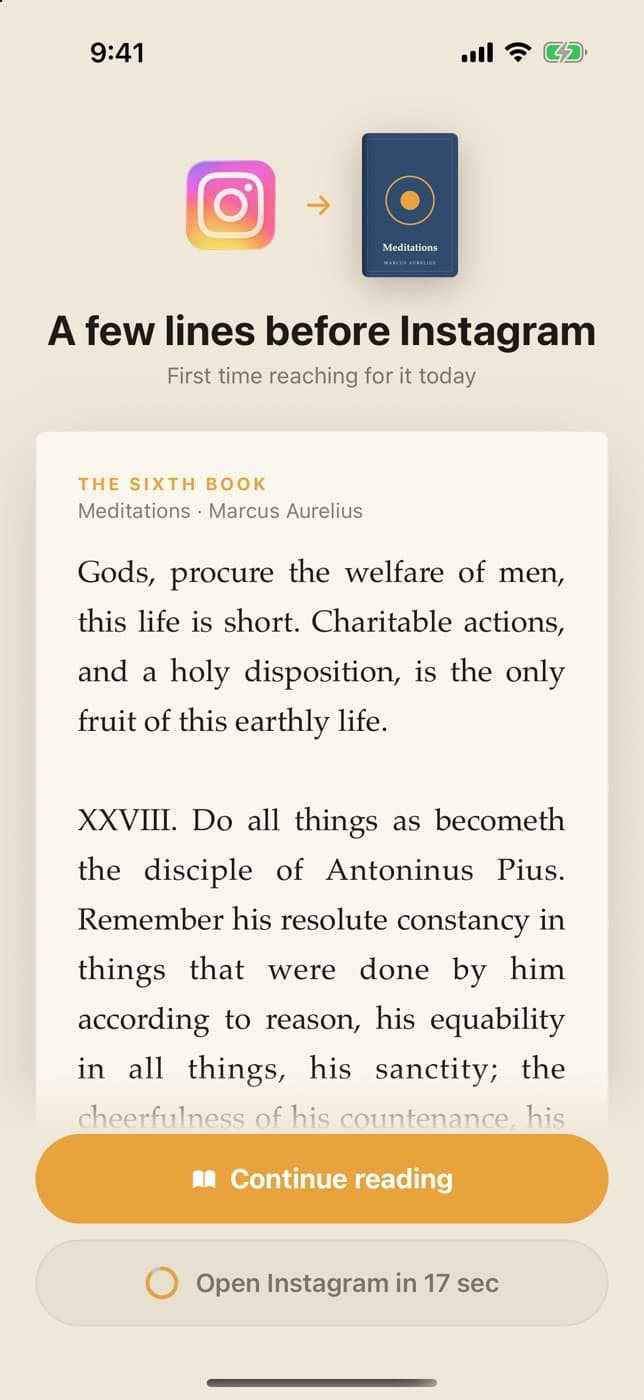
Read a few lines
before you scroll.
Open Instagram and a few lines of your book come first. Then it lets you go. Forty pickups a day, and now some of them are reading. Free for everyone.
- 01
Pick the apps you reach for
Instagram, TikTok, YouTube, X, or any app. One Shortcuts automation, set up in a few taps.
- 02
Your book comes first
50 to 300 words, timed to how long they take to read. Then press and hold to open the app.
- 03
The book keeps up
Next time starts right after what you read, and so does the book. Scrolls become pages.
One page. Five things Librai does to it.
Translate
Keep scrolling and the page changes language. 23 of them, Chinese to Tamil. Librai translates the real page, not a summary of it.
English · original
The art of war is of vital importance to the State. It is a matter of life and death, a road either to safety or to ruin.
New · Comics & manga
Every balloon,
in your language.
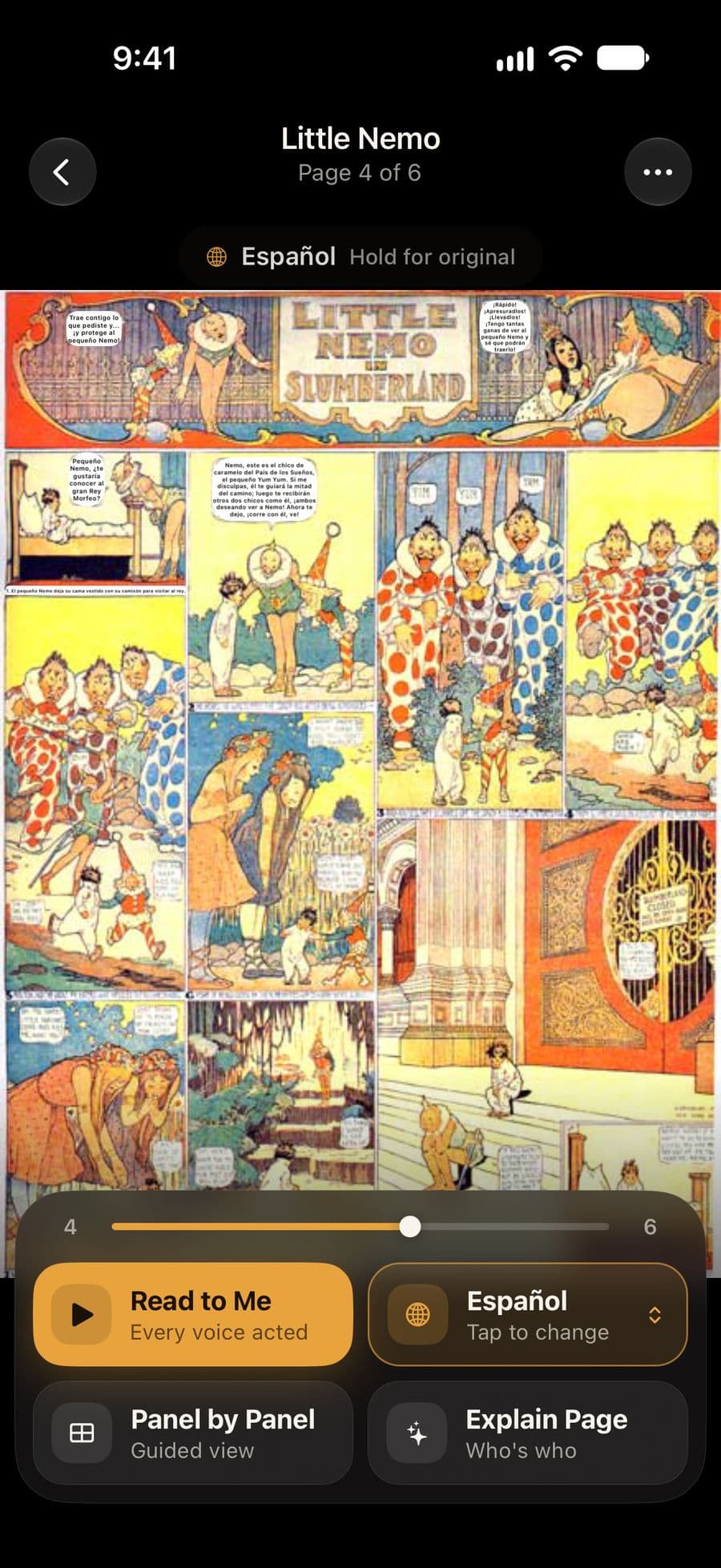
Open a comic or a manga and Librai finds every panel and every balloon. Then it can rewrite them, read them out, or walk you through the page.
Translate
Every balloon rewritten in place, right on the art, in 24 languages. Hold the button to peek at the original.
Read to Me
Each character gets a voice of their own, and the panel being read fills the screen.
Panel by Panel
One panel at a time, sized to your phone. Right to left for manga.
Explain Page
Who's who and what just happened. Back after a break? A recap of the story so far.
Works with CBZ, comic PDFs and manga EPUBs. 15 AI pages a day free. Read First shows the next page of your comic, too.
We all have a someday pile.
Librai helps you actually finish them.
Made to get you to the last page.
Starting is easy. Librai helps with the part after: picking it back up, keeping going, and remembering what you read.
Story so far
Back after a few days? Librai opens with a spoiler-free recap of what you've read. Ask for one any time from the reader menu. Free for everyone.
The story so far
Up to p. 48Sun Tzu has argued that a war is won in the planning, that a long campaign drains the state, and that the best victory needs no battle at all.
Only what you’ve read. Nothing past your page.
Reading plan
Say “finish this in 2 weeks” and Librai works out the pages. Today's goal sits on your home screen, with a gentle evening reminder.
Reading plan
Finish in 2 weeks
Book brief
Finish a book and get one page built from your own highlights: the book in one line, the key ideas, your quotes and things to try. Ready to share.
Book brief
ShareWin before you fight.
- · Plan first. Most battles are decided before they start.
- · Know yourself and know the other side.
“The supreme art of war is to subdue the enemy without fighting.”
Try this: write the plan down before Monday’s meeting.
Just ask. It does the rest.
Librai knows your whole library, and it acts. It reads a book to you with a sleep timer, catches you up on one you left, makes a Book brief, plans your month, and builds or tidies your collections. Ask it to change your goal, reminders, language or Read First in plain words. Every change comes with Undo, and bigger ones ask you first.

A little reading, every day.
The You tab keeps your reading in view, without guilt trips.
A line from your shelf
Each day Librai picks a line from the books you own and tells you why. Share it as a story or post card in the colours you like, or get it as a morning notification.
You have power over your mind, not outside events. Realise this, and you will find strength.
Marcus Aurelius · Meditations
Today, at a glance
Your daily goal, your streak and your month in books, ready to share as Reading Wrapped. Read First's count of scrolls turned into pages sits right on top.
🔥 4-day streak
Gentle reminders
An evening nudge at the time you choose, and a Sunday check-in on how your week went. Tap it and the chat already has the answer.

Time to read
A few pages tonight keeps the streak going.
Your week in reading
2 hr 10 min, and 40 pages left in Dune.
Made for you if…
English isn't your first language.
Read the book you want, not the one that's been translated. Switch to your language page by page, and listen to it in a voice that speaks it.
Your hands are busy.
Commuting, cooking, walking the dog. Librai keeps reading with the screen locked, has a sleep timer, and always picks up where you left off.
You're studying.
Ask the AI to explain a hard page, or to highlight the key ideas for you. Keep notes next to the text, and get a one-page brief when you finish.
Dense text wears you out.
OpenDyslexic font, bigger spacing, Bionic Reading, and calm themes you can tune to your eyes.
Made for iPhone Duo and iPad
Open it. Read it like a book.
On the big screen Librai shows two facing pages, with the crease right where a book’s spine would be. Your shelf sits on one side and the book on the other, and every screen uses both halves.
Your books stay yours.
Books live on your iPhone and sync through your own iCloud if you want. Book text only goes to the AI when you use an AI feature, like translating a page, asking a question or getting a recap.
Opens the files you already have
Import from Files, or choose “Open in Librai” from any app.
Free to start. Pro when you’re hooked.
No card needed. Upgrade from inside the app whenever you like.
Free
Everything you need to try it properly.
- Up to 3 books, in every format
- Reading and listening with no limits
- Apple's natural voices, on your device
- 5 translated pages a day
- 5 AI messages a day, plus a few shelf scans
- 15 AI comic pages a day
- Read First, daily quotes and reminders
- Story so far on every book
- Your first Book brief and reading plan
Pro
Free trial on yearlyFor when Librai becomes how you read.
- Unlimited books
- Up to 500 translated pages a day
- Comics translated, voiced and explained, page after page
- The next page is translated before you turn to it
- Messy PDFs rebuilt into clean, readable pages
- 250 AI messages a day, more web lookups and shelf scans
- A Book brief and reading plan for every book
Monthly or yearly, billed through the App Store.
Questions, answered.
How does Read First work?
You choose the apps, like Instagram or TikTok, and add a Shortcuts automation in a few taps (Librai walks you through it). When you open one of them, Librai shows a few lines of the book you're reading first, from 50 to 300 words, then you hold to open the app. You choose how long the app stays free afterwards. It's free, and you can turn it off any time.
Which books can I open?
Any EPUB, PDF, MOBI, AZW, AZW3, FB2 or CBZ file you own, including comics and manga. Import from the Files app, or use “Open in Librai” from email, Safari or any other app.
How do comics work?
Open a CBZ, a comic PDF or a manga EPUB and Librai opens it in its comic reader: swipe page by page, scroll like a webtoon, or read right to left. The AI can rewrite every balloon in your language right on the art, read the page aloud with a voice for each character, guide you panel by panel, and explain who's who. Free covers 15 AI comic pages a day; Pro covers whole series.
Is the translation just a summary?
No. Librai rewrites the actual page you're on, sentence by sentence, keeping names and quotes as they are. Press and hold the language label to see the original whenever you want.
Which languages can it translate into?
24 languages, plus Hinglish: Spanish, Chinese (Simplified and Traditional), Hindi, Arabic, French, Portuguese, Bengali, Russian, Japanese, German, Korean, Indonesian, Urdu, Persian, Turkish, Italian, Vietnamese, Thai, Polish, Dutch, Ukrainian, Tamil, and plain English for when the original is hard going.
What can the AI actually do?
Explain a line, and also act on it. In a book it can highlight sentences, save notes, turn to a passage, start Listen from a line and search the whole book. From the home chat it can recommend books and add them, read a book to you with a sleep timer, catch you up, make a Book brief, plan your month, make, fill, rename or delete collections, change your goal, reminders, language and Read First, and quiz you on your highlights and saved words. It shows each step it takes, and replies in your app's language.
Does the AI change my books?
Only when you ask it to. Everything it changes comes with an Undo card, and bigger changes, like removing books or deleting a collection, ask you to confirm first.
Will it spoil the ending?
No. When you ask about a book, the AI only uses the part you've already read. The Story so far recap stops at your page too.
How do reading plans work?
Set a finish date, or just tell the AI “finish this in 2 weeks”. Librai turns it into a daily page goal on your home screen and sends an evening reminder. Your first plan is free; Pro gets one for every book.
Can it read a translated book out loud?
Yes. Turn on a translation and press Listen. Librai reads the translated page in a voice for that language, highlights each sentence, and turns the page for you.
Do the voices cost extra?
No. Librai uses Apple's voices, which run on your iPhone, work offline and cost nothing. For the most natural sound, download a free Premium voice in Settings → Accessibility → Spoken Content; Librai shows you how.
Does it keep playing when I leave the book?
Yes. Close the book, switch apps or lock your phone and it carries on. Control it from the lock screen, your headphones or the mini player in the tab bar, and set a sleep timer for bedtime.
PDFs are tiny on my phone. Does Librai help?
Yes. Librai trims the empty margins so the text fills your screen at full sharpness, and skips the dark edge a scanner leaves. Two-column papers are read one column at a time: tap the right edge to move down the column, then on to the next. Pinch out any time to see the whole page.
My PDF looks messy. Can Librai fix it?
Turn on Customize Layout and Librai turns the PDF into clean, flowing pages with your font and size, splitting long pages into screens you swipe through. Contents pages and lists keep their structure.
Does it work offline?
Reading and listening work offline. Translating new pages and asking the AI need a connection, but pages you've already translated stay saved on your phone.
Where are my books stored?
On your iPhone or iPad. Turn on iCloud sync to keep your library, highlights and progress the same across your Apple devices.
Is there an Android version?
Not yet. Librai is on iPhone and iPad today.
~ Fin ~
Your someday pile is waiting.
Start with the book you’ve put off the longest.